
Your AI studio engineer for Logic Pro
Say it.
AIME does it.
Ask for a warm vocal chain, a rough mix or eight choir tracks. AIME reads your session and does the work in Logic Pro, step by step, while you watch.
For Mac · macOS 14 or later · Logic Pro
How it works
Say it, AIME does it.
1/4Ask in plain English
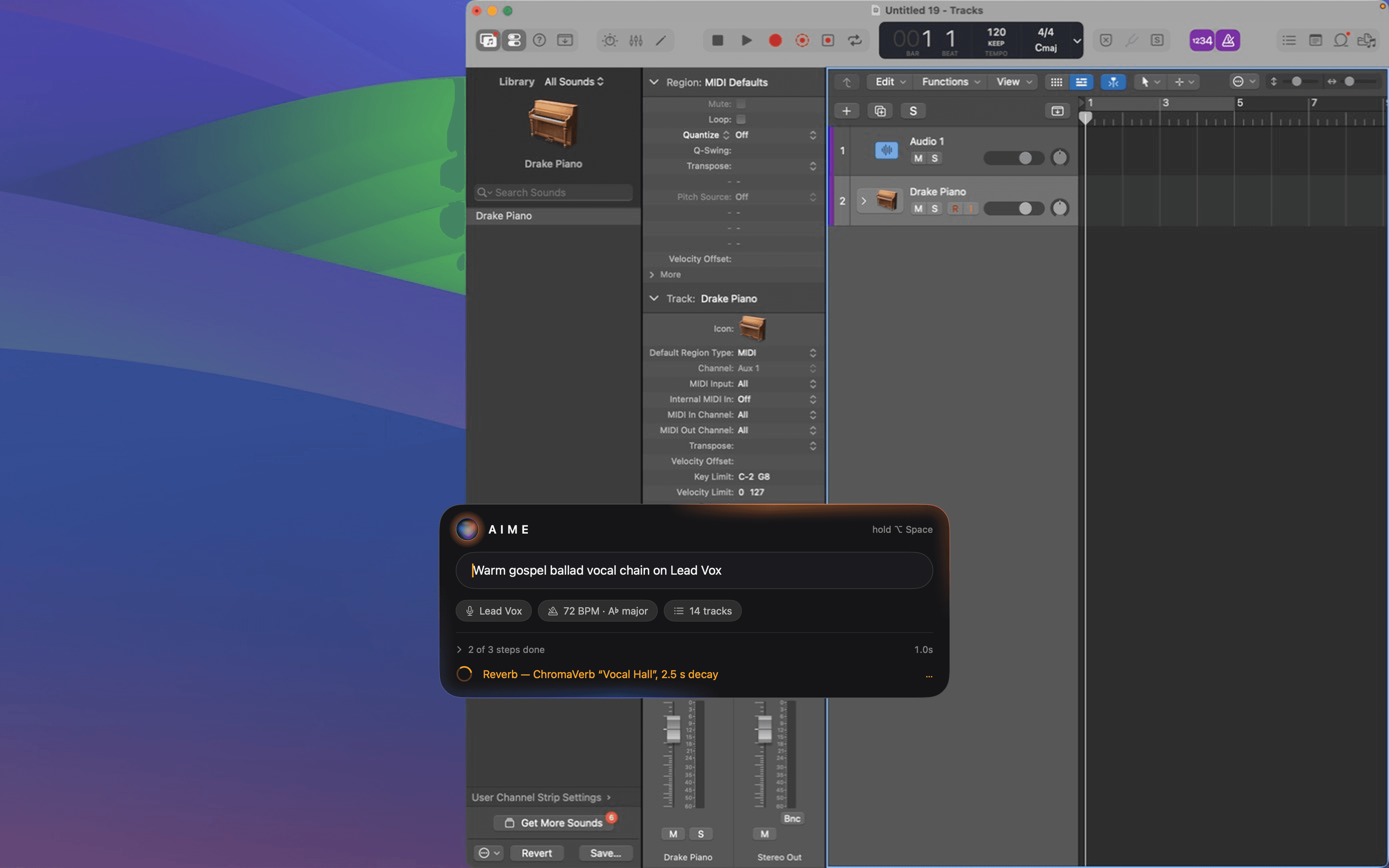
Press ⌥ Space from anywhere, even with Logic in front. The bar already knows the selected track, the tempo and key, and how many tracks you have.
What it can do
One bar. Most of Logic.
AIME reaches Logic's mixer, plug-ins and presets, the sound library, tracks, menus and a library of 667 key commands. These are real lines from its step list.
On your Mac
Floats over Logic. Never gets in the way.
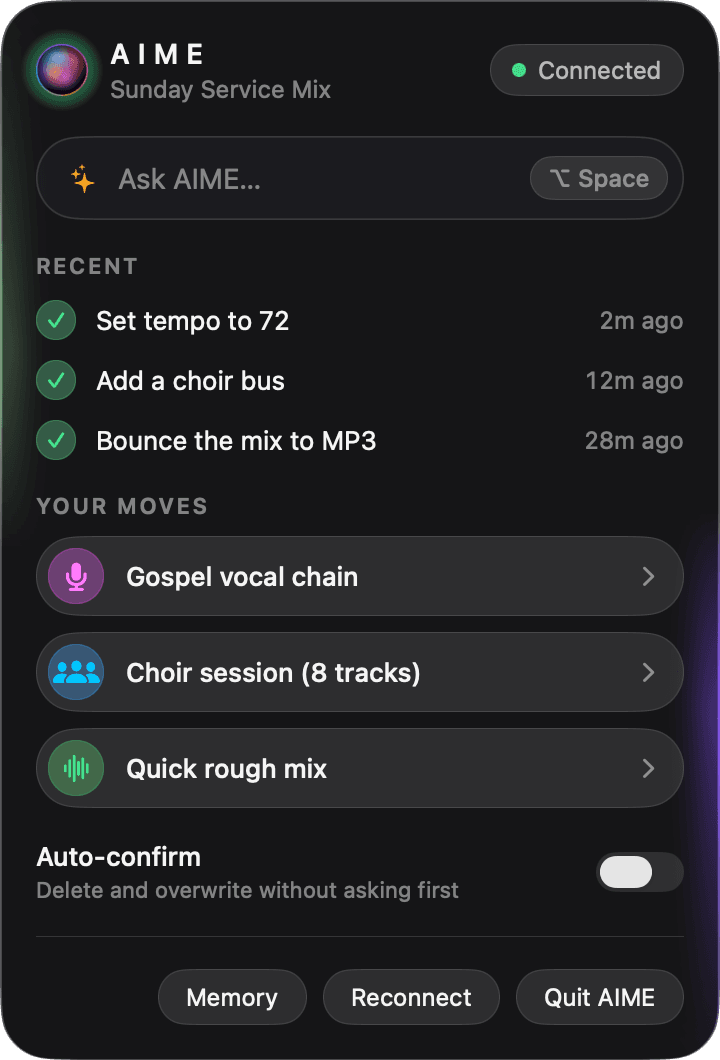
The bar sits in the lower middle of your screen and never takes focus from Logic. Esc hides it. The menu drops from the orb in your menu bar, with your recent requests, your Moves and the connection to your project.
Features
An engineer that asks first.
Fast when you want fast, careful when it matters, and it gets better at your sound the more you use it.
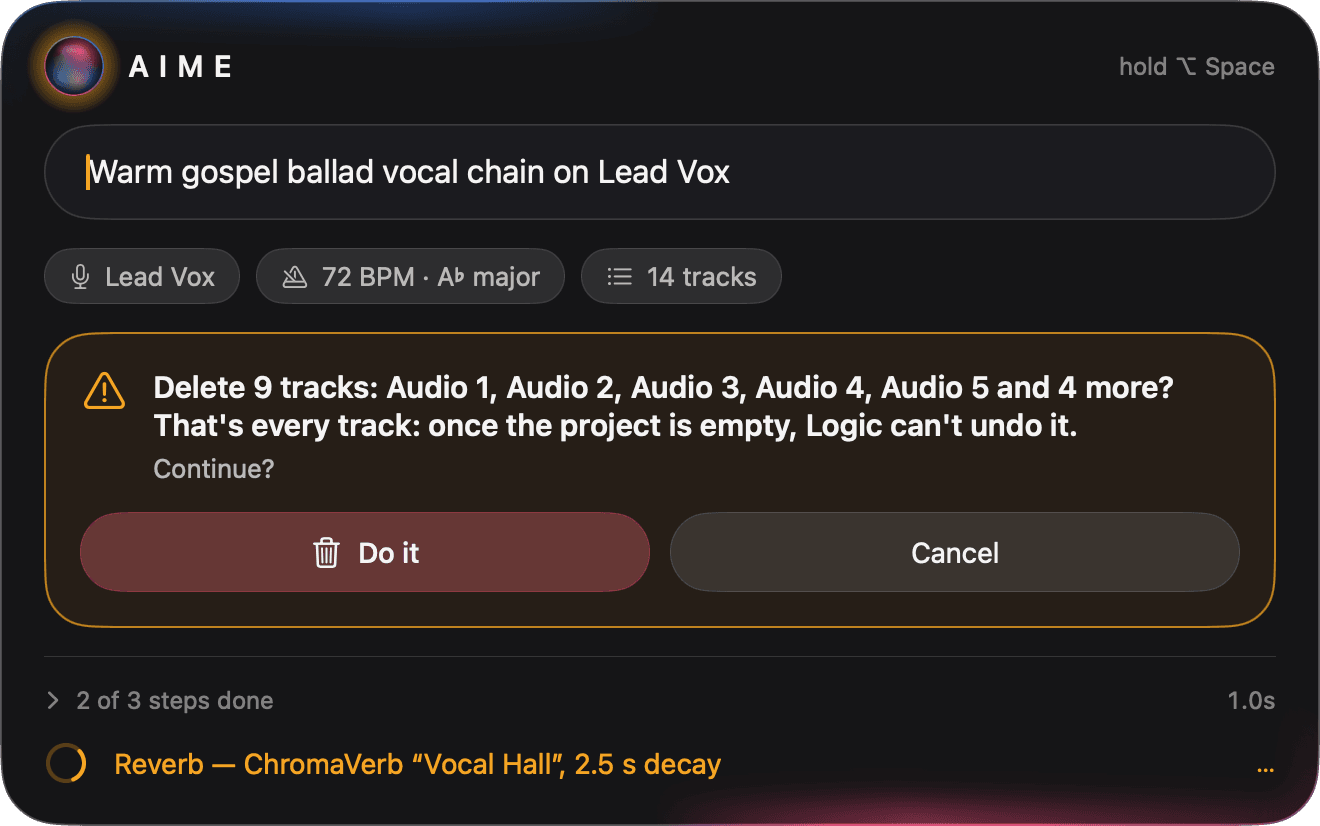
Asks before anything it can't take back
Deleting tracks, overwriting, or any menu command that removes, clears or quits gets a plain-English question first. Delete every track and AIME warns you that Logic can't undo it. Auto-confirm is off until you turn it on.
Your Moves
When a request works, choose Save as Move. Next time it's one click from the menu bar.
Learn as you go
Every reply can end with a Tip: the shortcut or menu path, so next time you can do it yourself.
Remembers your sound
Your preferences, recipes and what worked, kept as files on your Mac that you can read and edit.
Big jobs stay tidy
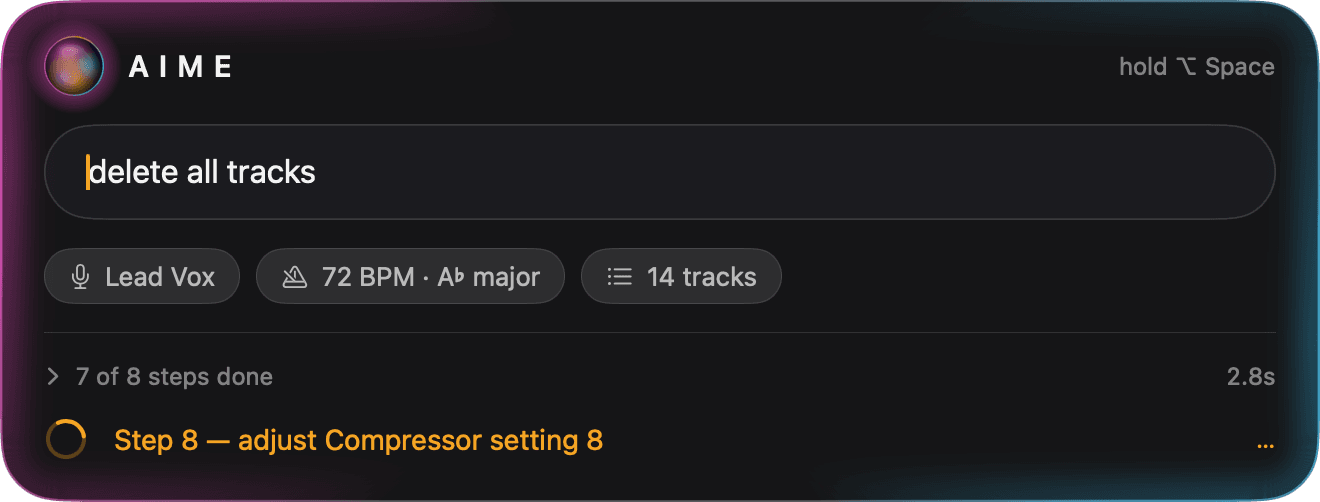
Long runs fold into one line, “7 of 8 steps done”, with the latest step live. Open it to see everything.
Hold ⌥ Space and talk
Push-to-talk is on the way, so you can ask without taking your hands off the keys. Today, you type into the bar.
Integrations · on the roadmap
From the session to the release.
AIME is growing out from Logic Pro to the places your music goes next. These connections are planned and in progress. None of them are live yet.
DistroKid
PlannedRelease a finished song to streaming in one command.
“Send this mix to DistroKid for Friday.”
BeatStars
PlannedUpload a beat and list it for sale.
“Bounce the beat and list it on BeatStars.”
Splice
PlannedFind samples and pull them straight into the session.
“Find a dusty vinyl kick on Splice.”
Suno
PlannedGenerate a song idea and import the stems as tracks.
“Sketch a gospel intro and bring in the stems.”
Spotify for Artists · Apple Music for Artists
PlannedPush release metadata and artwork.
“Update the artwork for Sunday Service.”
SoundCloud
PlannedPost a rough mix or demo.
“Post this rough mix to SoundCloud, private.”
Dropbox · Google Drive
PlannedBack up projects and share stems with collaborators.
“Share the vocal stems with the band.”
LANDR
PlannedSend a bounce for mastering and bring the master back.
“Master this and put it on a new track.”
Loopcloud · Native Instruments
PlannedSearch sounds and load instruments.
“Load a felt piano from Native Instruments.”
Ableton Link · MIDI hardware
PlannedSync tempo and map controllers.
“Map my knobs to the vocal chain.”
Product names are trademarks of their owners. Listing them doesn't mean they endorse or partner with AIME.
Pricing
Pro costs less than a coffee a week.
Every plan comes with credits each month. Pick the one that fits how often you're in Logic.
Free
Try it on your own sessions.
Free for good
A week
£025 credits
every month
- Everything AIME can do in Logic
- No card needed
- Upgrade any time
Pro
14 days freeFor producers in Logic most days.
Billed monthly, cancel any time
A week
£2.311,000 credits
every month
- Everything in Free
- Max mode for the hardest jobs
- 14-day free trial, no card needed
Studio
For full-time studios and long sessions.
Billed monthly, cancel any time
A week
£5.772,500 credits
every month
- Everything in Pro
- 2½ times the credits of Pro
- Room for big mixes and long sessions
Founding Member · first 5,000 people
Pro for £4.99/month, locked in for life.
Everything in Pro at half the price, for as long as you keep it. That's £1.15 a week.
Need more? Top up.
300 credits for £4.99, and they never expire. If you run out mid-session, AIME offers a top-up in one click.
Students and music schools
Pro for £4.99/month. Email us to set it up.
Prices include UK VAT. A week is the monthly price × 12 ÷ 52, or the yearly price ÷ 52. Max mode uses more credits. AIME is in early access; these are the prices it launches with.
Get started
Three steps to your first Move.
Step 1
Install AIME
It lives in your menu bar as a small glass orb, not in your Dock. You need macOS 14 or later and Logic Pro.
Step 2
Let it press the buttons
Allow Accessibility so AIME can use Logic's menus, key commands and plug-ins. It joins Logic as a control surface called AIME Controller.
- ⌥
Step 3
Ask for something
Press ⌥ Space and type “Make a new audio track called Lead Vox”. Watch it happen.
FAQ
Questions, answered.
What is AIME?
AIME is an AI studio engineer for Logic Pro. It lives in your Mac's menu bar. Press ⌥ Space, ask for what you want in plain English, and it does the work inside your open project: plug-ins, mixer, sounds, tracks, menus and key commands. You see every step as it happens.
What do I need to run it?
A Mac running macOS 14 Sonoma or later, and Logic Pro. AIME needs Accessibility permission to use Logic's menus, key commands and plug-ins. It also connects to Logic as a control surface called AIME Controller, for transport, faders and track switches.
Will it mess up my session?
Before anything that deletes, removes, clears or overwrites, AIME asks you first in plain English. If a request would delete every track, it warns you that Logic can't undo that. Auto-confirm, which skips those questions, is off until you turn it on, and you can turn it off again with one click.
Can I talk to it?
Voice is on the way: hold ⌥ Space and speak. For now, you type your request into the command bar.
What happens to my project data?
To plan the steps, AIME sends your request and what it reads from Logic, such as track names, tempo, key and plug-in settings, to Claude, Anthropic's AI model. It doesn't record or upload your audio. AIME's memory, your preferences and saved recipes, is kept on your Mac as files you can read and edit.
Does it work with DistroKid, Splice and the rest?
Not yet. Those integrations are planned and in progress. Today AIME works inside Logic Pro.
What counts as a credit?
Credits are what AIME uses to do the work you ask for. Max mode, which uses a stronger model for harder jobs, uses more of them. A meter in the menu bar shows what's left, and if you run out, AIME offers a top-up in one click.
How do I get it?
AIME is in early access. Email us and we'll get you set up.

Spend the session on the song.
AIME handles the clicks. You keep the ideas, the takes and the final say.
Get early accessTell us a little about your setup and we'll get you in.